
Experiment · Data preparation
Before AI reads your CSV: an eight-case parsing experiment
We tested two CSV readers on eight original fixtures. Inspect the failures, reproduce the results, and use the import checklist before your next AI analysis.
In this article
The comma that turned one note into two columns
An AI assistant can explain a table convincingly even after an earlier step has damaged it. That is the uncomfortable starting point for this experiment. If a customer's note contains a comma, splitting a CSV row at every comma changes the data before the model sees it. The resulting answer may look like a reasoning failure. The actual failure happened in ordinary text processing.
For this TrendsWhat lab, we created eight small, synthetic CSV fixtures and ran two readers against exactly the same inputs. One reader splits lines and commas. The other uses Python's standard CSV parser. We compared their complete output with expected tables written into the experiment. The simple reader passed five cases. The CSV parser passed eight. Those counts are the outcome of this local run, not an estimate of how frequently real customer files fail.
This is a directly executed workflow experiment, assisted by AI during preparation. It does not compare language models, use private customer records, or claim that the operator personally encountered these eight incidents. The fixtures make a boundary visible: a model should receive data whose structure has already been checked.
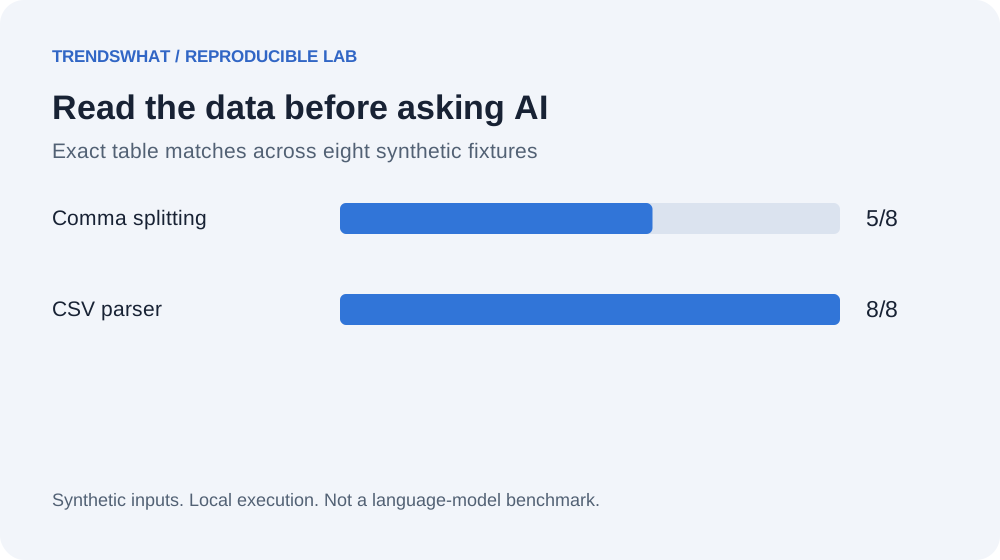
Original TrendsWhat figure, generated from the downloadable local results. A pass requires the complete parsed table to match the expected table.
Why we tested the step before the prompt
A common AI workflow begins with a spreadsheet export and ends with a summary, a classification, or a list of actions. Between those endpoints, someone converts rows into text. That conversion feels mechanical, so it attracts less attention than the prompt. Yet it determines whether the prompt contains the right records at all.
Consider a two-column file containing a name and a note. The note is “hello, team.” A comma splitter sees three fields. If the next step silently keeps only two, it loses “team.” If it assigns the extra field to another property, it creates a different record. Neither outcome is fixed by asking the model to be accurate. The model cannot reliably reconstruct punctuation and boundaries that were discarded upstream.
The useful question is therefore smaller than “Can AI analyze spreadsheets?” We asked: which of these eight explicitly defined records retain their intended structure under two conversion methods? That question has an answer we can inspect without paying for inference, exposing a document to another service, or judging whether prose sounds persuasive.
The experiment contract
We chose fixtures that each emphasize a different behavior: a plain row, a quoted comma, a quoted newline, an escaped quote, an empty field, a leading-zero identifier, non-English text, and Windows-style line endings. Every fixture includes a header and one data record. The expected output preserves strings; identifiers are not converted to numbers.
A case passes only when the entire nested list equals its expected value. Correct row count alone is insufficient. A parser that retains two columns but leaves quotation marks in the note still fails. A parser that changes 0012 to 12 also fails, even though the numerical values might seem equivalent. In an identifier column, those strings can represent different records.
We deliberately did not include malformed files, unknown encodings, giant cells, formulas, or mixed delimiters. Those require additional decisions and would answer a broader question. Keeping the first experiment small makes it possible to read every input and expected result rather than trust an aggregate score.
What actually ran
The baseline uses splitlines() followed by split(','). The alternative uses csv.reader over an in-memory text stream. Both functions receive the same source string. There is no model call, statistical sampling, network access, or hidden preprocessing in the lab.
Download the experiment script and run it with Python 3:
python3 run-labs.py --output results.json
The script runs all four TrendsWhat starter labs. Open the csv section of the resulting file to inspect each input, expected table, both outputs, and pass flags. The recorded results include the actual interpreter version and execution timestamp. Your timestamp will differ, but these fixture outcomes should remain the same under equivalent behavior.
Python's CSV documentation explains the reader, quoting controls, and newline handling used here. That source supports the parser mechanics. Our eight-case outcome comes from the attached execution record, not from the documentation.
Reading the results without overselling them
| Fixture | Comma splitting | CSV parser | What the comparison checks |
|---|---|---|---|
| Plain row | Pass | Pass | Ordinary column boundaries |
| Quoted comma | Fail | Pass | Punctuation inside a field |
| Quoted newline | Fail | Pass | A record spanning physical lines |
| Escaped quote | Fail | Pass | Literal quotes inside quoted text |
| Empty field | Pass | Pass | An intentionally blank value |
| Leading zero | Pass | Pass | Identifier preserved as text |
| Unicode | Pass | Pass | Non-English text retained |
| CRLF endings | Pass | Pass | The selected line-ending format |
The three failures share a useful characteristic: they depend on CSV syntax, not on difficult language. The baseline is adequate for the simple strings in this fixture set, but it does not implement the file format. The parser succeeds because interpreting that syntax is its job.
Eight out of eight is not a certification that all CSV files will load correctly. The test does not establish a success rate for unknown files. It shows that replacing an informal shortcut with a format-aware reader preserves these particular edge cases. That is already enough to justify removing the shortcut from a comparable import boundary.
The surprising limitation: correct parsing is not correct interpretation
Our leading-zero case passes both methods because neither converts types. A spreadsheet application could still change the identifier when someone opens and resaves the file. Likewise, a parsed empty string does not explain whether a respondent skipped a question, a field was unavailable, or a system intentionally erased the value.
After parsing, a second contract is needed. Specify required columns, allowed empty values, identifier formats, units, and the meaning of dates. A table can be syntactically correct while combining dollars with cents or interpreting a day-month date as month-day. Those problems belong to validation and domain interpretation, not quotation handling.
This separation improves an AI prompt. Instead of asking the model to clean everything at once, provide a validated table and a list of unresolved interpretation questions. If a required unit is missing, the workflow should return that uncertainty explicitly. It should not invent a unit simply because the output template contains a unit field.
A reusable import-to-analysis workflow
Start by preserving the original file. Work on a copy and record a stable source identifier. Then parse with a reader configured for the declared format. Confirm headers and inspect records that violate the expected shape. Keep those records in a visible exception list instead of silently dropping them.
Next, validate meaning. A customer identifier remains text. An amount carries a currency and scale. A timestamp carries a timezone or a clearly stated absence of one. A category can contain an unknown value without being forced into the nearest familiar category. Only after these checks should the workflow create an AI-readable representation.
For the model step, assign an explicit task such as grouping already validated notes into themes. Require row identifiers beside examples so a reviewer can trace a theme back to the source. Finally, compare the returned identifiers with the allowed input set. A beautifully written summary that cites an identifier absent from the input should be held for review.
Copy this worksheet
| Checkpoint | Record before proceeding | Stop condition |
|---|---|---|
| Source | File name, owner, permitted use | Unclear permission to process |
| Format | Encoding, delimiter, quoting rules | Parser cannot read consistently |
| Structure | Required headers and row count | Missing or duplicate headers |
| Meaning | Units, date rules, identifier types | Ambiguous units or dates |
| Exceptions | Rejected record IDs and reasons | Silent loss of records |
| AI handoff | Task and allowed source IDs | Missing provenance |
| Review | Sampled claims mapped to rows | Invented or mismatched evidence |
This worksheet is intentionally independent of a particular model. You can use it with a chat interface, an API, or a manual analysis process. Its purpose is to make the transformation boundaries reviewable. The right automation may still include a person deciding what an ambiguous column means.
How to extend the lab responsibly
Add a semicolon-delimited fixture only after defining whether the reader will be configured for semicolons or expected to infer the format. Otherwise, you are changing both the test and the task. Add a malformed quote only after deciding whether rejection is the correct outcome. A failure to parse can be a successful safety behavior when a file violates the declared contract.
For a team workflow, collect sanitized examples of actual import failures and add their expected interpretation before editing the reader. Keep a separate set that was not used to choose the fix. That reduces the chance of celebrating a solution tuned only to familiar examples. Report which families of cases remain untested.
Avoid attaching business productivity numbers to this lab. We did not measure import time, reviewer effort, or downstream model quality. If those outcomes matter, measure the complete workflow on permitted examples and include exception handling time. A parser improvement may be essential even when it saves no measurable minutes, because preserving records is a correctness requirement.
The decision this experiment supports
Use a format-aware reader before asking AI to reason over a CSV export. Preserve identifiers as strings, validate the meaning of columns separately, and retain a path from every generated claim to the original row. These are modest steps, but they keep an avoidable preprocessing error from being disguised as intelligent analysis.
The next time a summary seems wrong, inspect the input the model actually received. Compare it with the original file before changing the prompt. In this experiment, three failures became visible at precisely that boundary. The lesson is practical: good AI work includes careful ordinary software around the model.
Sources, materials, and limits
- Python CSV reference: primary documentation for the parser and newline behavior.
- Runnable lab and complete synthetic fixtures: original TrendsWhat material, MIT licensed.
- Recorded output: per-case results, interpreter version, and execution time.
- Study scope: eight hand-selected fixtures, two deterministic readers, no external AI model, no real customer data, and no productivity measurement.