
Experiment · Data preparation
Before you paste: what an email redaction filter misses
A local test of ten fictional inputs shows why removing emails is only one preparation step. Includes complete results and a reusable pre-prompt checklist.
In this article
The email disappeared; the identifying information did not
A redaction preview can look reassuring for the wrong reason. Replace an email address with [EMAIL], and the most recognizable sensitive string vanishes. But a phone number, customer identifier, or differently written address may remain. A person preparing text for an AI tool can mistake one visible replacement for a complete privacy review.
We tested that narrow boundary with ten synthetic text fixtures. A regular expression removed conventional email addresses. It fully removed the marked information from five of the nine fixtures containing information we wanted to withhold. One additional fixture contained no marked information and remained unchanged. Four sensitive fixtures retained their marked text.
The important result is the denominator. “Six of ten cases passed” includes the harmless control case. “Five of nine sensitive cases were completely redacted” describes the meaningful limitation more clearly. Neither number is a real-world detection rate. These are intentionally selected examples run locally to demonstrate why an email filter should not be described as an anonymizer.
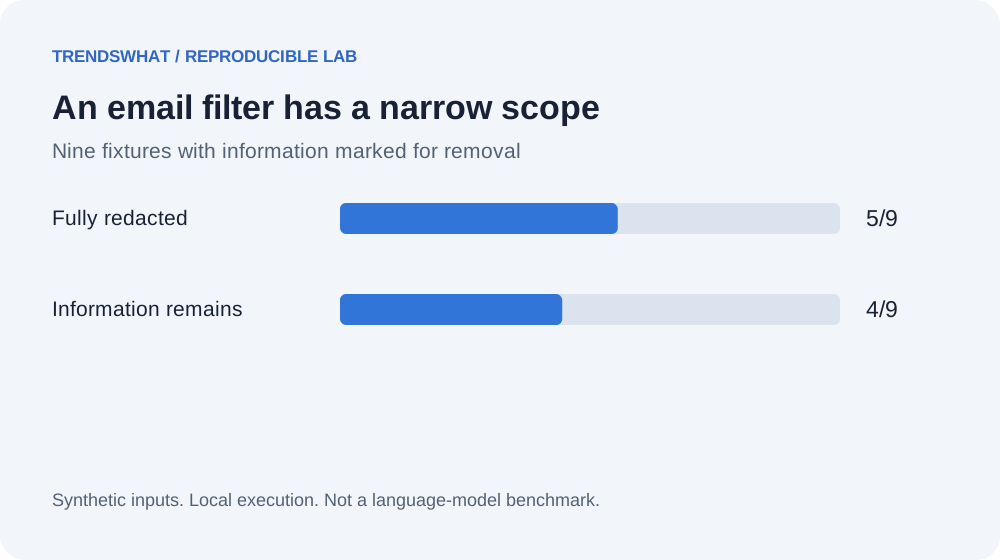
Original TrendsWhat figure from the synthetic lab. “Sensitive” means marked for removal in this fixture, not a legal classification or a guarantee about identifiability.
Why this belongs in an AI workflow
Before asking an assistant to summarize a support conversation, someone decides what text to send. That decision often receives less attention than whether the answer is useful. Yet after material is sent, a later rewrite cannot undo the initial disclosure. The useful control therefore sits before the prompt is submitted.
Our lab does not determine whether a particular AI provider may process a given document. It tests a local text transformation that might be used during preparation. The distinction is deliberate. Permission, contracts, account settings, and applicable obligations require their own assessment. A string replacement cannot resolve those questions.
For everyday work, the practical sequence is to decide whether the task requires the original data, minimize the material, inspect the remaining text, and only then use an approved tool. If a fictional example can answer a design question, it may remove the need to send a real record at all. That is the approach used for this experiment.
The fixture design
We included five conventional email patterns: a simple address, an address with a plus suffix, a subdomain, uppercase text, and a sentence containing two addresses. We also included an obfuscated address written with [at] and [dot], an address with a Korean local part, a fictional phone number, and a fictional customer identifier. The tenth fixture is an ordinary sentence about a completed build.
Every sensitive fixture has an explicit list of spans that should disappear. The test succeeds for that fixture only when none of those exact spans remain in the output. This is a narrow, transparent measurement. It does not score whether the remaining sentence can identify a person by context or whether the replacement creates an unintended meaning.
All identities and records are fictional. The email examples use example domains, and the script makes no network calls. There is no scraping of inboxes, no real support export, and no submission to an external AI service. Readers can inspect every string before running the experiment.
What the filter actually does
The regular expression looks for an ASCII-style email shape: a local part, an @ symbol, a domain, and an alphabetic suffix. It replaces each match with [EMAIL]. The pattern is intentionally an email filter, not a comprehensive implementation of every possible address syntax.
Python's regular expression reference documents the matching and substitution mechanism. The specific pattern, fixture labels, and outcome are our original lab material. This distinction matters because using a standard library does not validate the scope of a particular pattern.
Run the downloadable script with python3 run-labs.py --output results.json. The redaction section exposes the pattern, inputs, expected spans, transformed outputs, and remaining spans. The recorded output includes the interpreter version and execution time, allowing you to distinguish a reproduced result from an assumed one.
Results worth inspecting individually
| Fixture | Complete removal of marked spans? | Why |
|---|---|---|
| Simple email | Yes | Matches the selected pattern |
| Plus suffix | Yes | Plus is included in the local-part pattern |
| Subdomain | Yes | Domain pattern includes periods |
| Uppercase address | Yes | Uppercase letters are included |
| Two emails | Yes | Substitution processes both matches |
| Obfuscated address | No | No literal address shape |
| Korean local part | No | Local-part pattern is ASCII based |
| Phone number | No | Not an email address |
| Customer identifier | No | Not an email address |
| Ordinary text | No marked span to remove | Negative control remains unchanged |
The phone and customer identifier failures are not bugs in an email-only filter. They are failures in the larger expectation that the filter makes text ready to share. That is why naming matters. A button labeled “Remove conventional email addresses” describes a limited operation. A button labeled “Make safe” promises a judgment the code cannot provide.
The non-English case is useful because it exposes an assumption that can hide in a familiar-looking pattern. Adding another language to a user interface does not automatically extend the behavior of a text filter. If a workflow handles multilingual material, its preparation tests need multilingual material too.
The false sense of completion
Imagine an illustrative support note containing an email address, a project name, and a description of a rare incident. Replacing the email does not necessarily make the story anonymous. People familiar with that project could recognize the situation. Our fixture checker would not detect that inference unless the revealing spans were explicitly marked.
The same limitation applies to replacing names with labels such as “Customer A.” If the rest of the record includes a distinctive title, location, timestamp, or event, a label may change appearance without sufficiently changing disclosure. This is an editorial risk assessment, not a result measured by our string-based test.
For this reason, minimize the information needed for the task before choosing a redaction technique. If you are asking for a clearer sentence, you rarely need a real account identifier. If you are asking how to handle a retry, you can usually describe the state transitions using fictional records. Redaction is easier when the input has already been narrowed.
A reusable preparation workflow
First, state the actual purpose of the AI request. “Explain why this error occurs” is more specific than “analyze these logs.” Identify which fields are necessary to answer that question. Create a working copy containing only those fields, and keep the original in its existing approved location.
Second, replace direct identifiers and remove unrelated details. Inspect both the transformed text and the replacement rules. Check whether a pattern accidentally removes useful technical structure, such as an address used only as a harmless example, or misses a relevant format. Keep any replacement map outside the material sent to the assistant.
Third, review the remaining context. Read it as someone who knows the project. Could the combination of details reveal a person or confidential event? If so, simplify further or use a synthetic example. Finally, confirm that the chosen tool and account are appropriate for the remaining information. If that cannot be established, keep the work local or ask the responsible owner.
Copy this pre-prompt checklist
- Define the question the assistant needs to answer.
- Remove files and fields unrelated to that question.
- Replace real examples with fictional ones when behavior can still be demonstrated.
- Check conventional and nonstandard identifiers, including non-English formats.
- Inspect customer IDs, internal URLs, timestamps, and distinctive event descriptions.
- Review the transformed output, not just the list of replacement rules.
- Keep replacement maps, credentials, and original records outside the prompt.
- Use the approved destination and account for the remaining material.
- Stop when permission or the residual disclosure is unclear.
The checklist is a preparation aid. It is not a certification that text is anonymous, a substitute for organizational requirements, or a statement about any vendor's current retention settings. Its value is that it prevents one successful substitution from being treated as the end of the process.
How to improve the experiment
A useful next version would add fixtures from the formats your workflow genuinely encounters, after replacing real identifiers with fictional equivalents. Specify what should be removed and what should remain. Include harmless negative examples so you can see when the filter damages legitimate content as well as when it misses marked information.
Keep separate metrics for complete-case removal, missed spans, and unnecessary replacements. One case may contain several identifiers. Counting it as partially successful can hide the one item that matters. Conversely, deleting an entire document would remove every marked span but make the workflow useless. A good evaluation must consider preservation as well as removal.
If you add a model-based redactor, compare it against the same expected spans and inspect contextual disclosures separately. Record the actual model, settings, input, output, and review method. Do not reuse the deterministic counts from this article as evidence that the model behaves similarly. You would be running a different experiment.
What we learned from the narrow failure
The email filter behaved as its pattern predicted. The problem appeared when its limited behavior was compared with a broader goal. This is a recurring design issue in AI systems: a small automated action can be correct while the surrounding product language overstates what has been achieved.
A more honest workflow makes the remaining work visible. Show what was removed, explain the scope of the filter, and retain a review step for context and permission. For a person using AI in daily work, that is more actionable than a vague reminder to be careful with data.
Our result is intentionally modest. Five sensitive fixtures were completely redacted; four were not. The practical lesson is to inspect the text that remains and name the transformation accurately. Reliable AI preparation begins with understanding exactly what a local helper has done before trusting it with a larger responsibility.
Sources, materials, and limits
- Python regular expression documentation: primary reference for substitution behavior.
- Executable script and synthetic fixtures; recorded output.
- Ten selected fixtures, nine containing marked information; no legal anonymization assessment, provider evaluation, private data, or external model calls.